It’s not DNS.There’s no way it’s DNS.It was DNS.
Fix it from your phone. PapiDNS lets you view and edit your GoDaddy DNS records on iPhone and iPad, with API keys that are encrypted before they leave your device.

Free to download. Viewing is free; editing needs Premium.
DNS is hosted at GoDaddy for this domain.
A @EDIT
203.0.113.10
TTL: 600
CNAME WWWEDIT
@
TTL: 3,600
MX @EDIT
10 mail.example.com
TTL: 3,600
TXT @EDIT
v=spf1 include:_spf.example.com ~all
TTL: 3,600
NS @
ns55.domaincontrol.com
TTL: 3,600
ns56.domaincontrol.com
TTL: 3,600
Your whole GoDaddy zone, in your pocket
For the 11 PM outage, the certificate that won’t validate, or the email records a vendor needs today. No laptop, no GoDaddy dashboard.
Record types you can add and edit
- A
- AAAA
- CNAME
- MX
- TXT
- SRV
NS and CAA records are listed too. You can add NS records; CAA records are view-only.
- Every record, live from GoDaddy
- PapiDNS reads your zone straight from GoDaddy's API, so what you see is what's published. Add a record set, change a value or TTL, or delete what you don't need.
- All your domains in one list
- Your GoDaddy domains load from your API key, and each one shows whether its DNS is actually hosted at GoDaddy.
- Production and test keys
- Save more than one API key, including OTE keys for GoDaddy's test environment, and choose which one is active.
- Nameserver moves, with a checklist
- Moving a domain's DNS to another host? Change its nameservers from the app after confirming what the move will affect.
- Help where you need it
- Built-in guides cover getting a GoDaddy API key, OTE versus production, and how your keys are encrypted.
- Bug reports from the app
- Premium members can send a bug report with a screenshot, or a feature request, from the app's menu.
Set up in three steps

Welcome to
PapiDNS
GContinue with Google
Continue with Apple
1.Sign in with Apple or Google
No new password to remember. Your PapiDNS account holds your encrypted keys, so they follow you to your other devices.
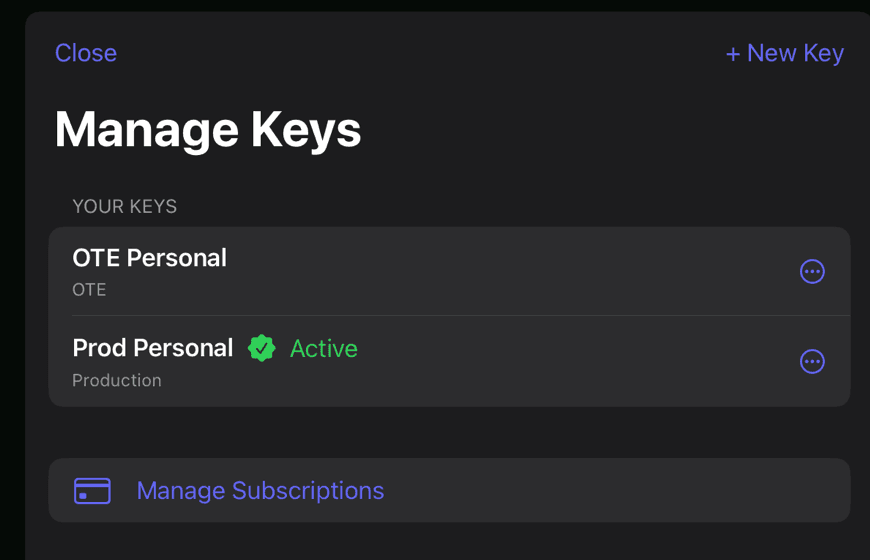
2.Add your GoDaddy API key
Create a key in GoDaddy's developer portal, paste the key and secret, choose Production or OTE, and set a passphrase. The key is encrypted before it's saved.
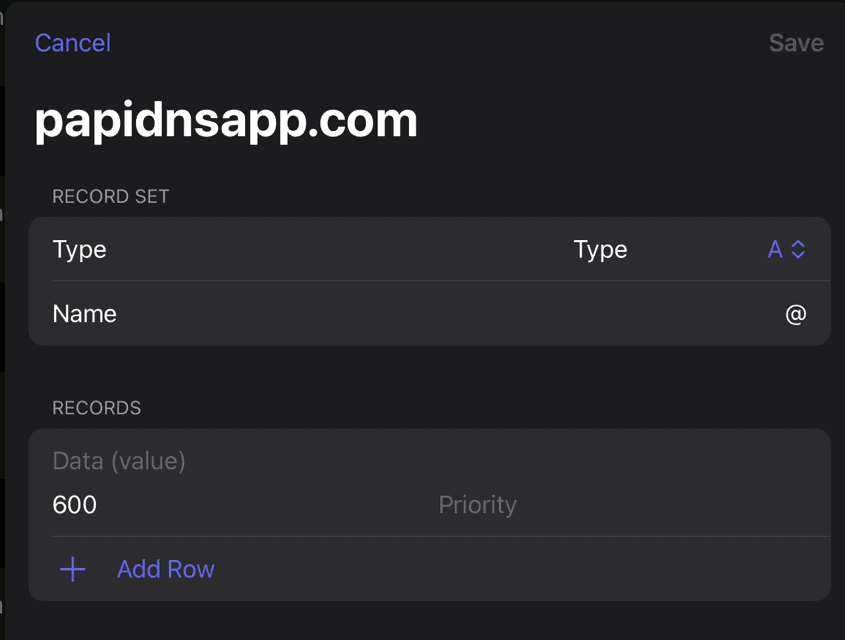
3.Pick a domain and edit
Every record for the domain is on one screen. Tap Edit, change the value, and save. The change goes to GoDaddy right away.
We can’t read your API keys
A GoDaddy key and secret can change every domain on your account, so PapiDNS treats them that way.
- Encrypted on your device
- Each key and secret is sealed with a random data key (XChaCha20-Poly1305). That data key is locked with one derived from your passphrase (Argon2id). Both run on your phone, using libsodium.
- We only store the locked box
- Our database keeps the encrypted key, the salt and settings needed to unlock it, and the key’s name and environment. Your passphrase and recovery code never leave your device, so we have nothing to decrypt it with.
- Straight to GoDaddy
- The app unlocks your key on the device and calls GoDaddy over HTTPS itself. Your DNS records don’t pass through our servers.
Your iPhone or iPad
- Passphrase and recovery code
- Never sent anywhere
- Unlocked key
- In memory only. With Remember on this device, the key that unlocks it stays in this device’s Keychain.
Encrypted key only
PapiDNS database
Ciphertext, salts, nonces and unlock settings
Your requests, over HTTPS
GoDaddy API
api.godaddy.com
Before you start: a GoDaddy API key
PapiDNS works through GoDaddy’s Domains API, so you’ll need an API key from the GoDaddy account that owns your domains.
- Sign in at developer.godaddy.com/keys with your GoDaddy account.
- Create a key. Choose Production for real domains, or OTE to try things in GoDaddy’s test environment.
- Copy the key and the secret. GoDaddy shows the secret only once.
GoDaddy decides which accounts get API access and how many calls they can make, and it changes those rules from time to time. Its API access help page has the current requirements.
Free to look. Premium to change.
Premium is a monthly or yearly subscription through the App Store. Prices are shown in the app and vary by country. It renews automatically until you cancel in your Apple Account settings.
| Feature | Free | Premium |
|---|---|---|
| See your domains and every DNS record | Included | Included |
| Save encrypted API keys, production and OTE | Included | Included |
| Add, edit and delete records | Not included | Included |
| Change a domain's nameservers | Not included | Included |
| Send bug reports and feature requests from the app | Not included | Included |
Questions people ask
Is PapiDNS made by GoDaddy?
No. PapiDNS is an independent app by Trees and Rain LLC. It works with GoDaddy through GoDaddy's public API, using an API key you create in your own GoDaddy account.
Which DNS providers does it work with?
GoDaddy. PapiDNS manages DNS that's hosted at GoDaddy, for any domain your API key can reach.
GoDaddy says my key is unauthorized or forbidden. What now?
Check that you pasted both the key and the secret, and that the key's environment matches: an OTE key only works against GoDaddy's test environment. If a production key is still refused, GoDaddy may not have enabled API access on your account yet.
Can you see my API keys or my DNS records?
No. Keys are encrypted on your device with your passphrase before they're stored, and we never receive the passphrase. The app talks to GoDaddy directly, so your records don't pass through our servers.
What if I forget my passphrase?
Unlock the key with your recovery code if you made one. Without either, delete the key in PapiDNS and add it again. You can always create a fresh key in GoDaddy's developer portal.
How do I cancel Premium?
Premium is billed by Apple. On your iPhone or iPad, open Settings, tap your name, then Subscriptions, choose PapiDNS and tap Cancel Subscription.
How do I delete my account?
You can delete your account in the app, or ask us to on the web without the app. Delete your account or data

Next time, it’s a quick fix.
PapiDNS is free on the App Store for iPhone and iPad. It needs iOS 18.2 or later and a GoDaddy API key.
Stuck or found a bug? Contact support